


CA Port Detail View
Overview
The detailed CA port information is displayed.
Screenshots
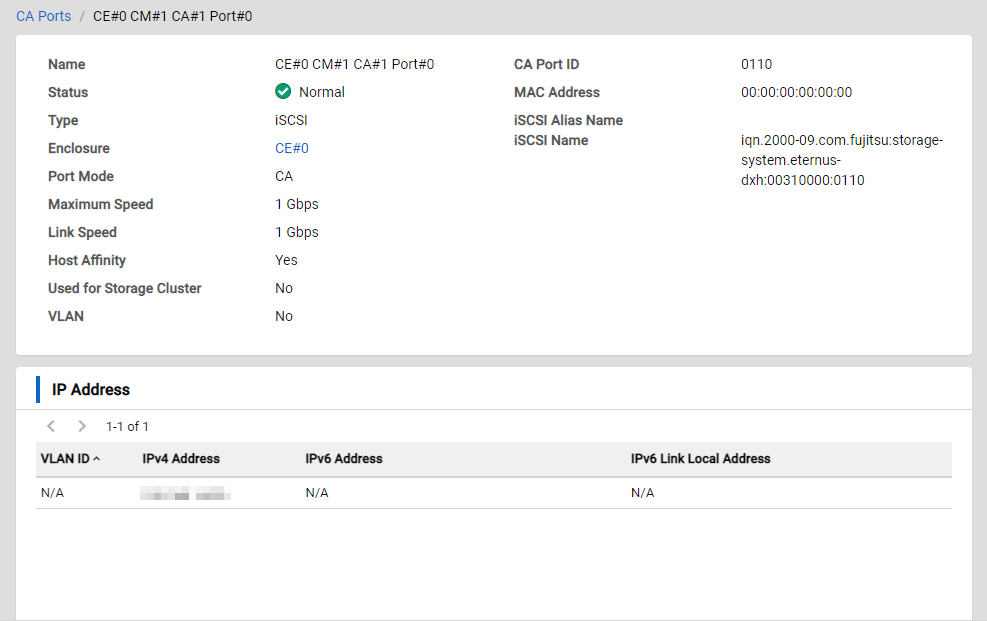
Actions
| Icon/Button | Description |
|---|---|
Back |
Displays the previous screen. Caution
|
CA Ports/xxx |
Click "CA Ports" to display the List View of the CA port. "xxx" indicates the name of the currently displayed CA port. |
IP Address Information
| Icon/Button | Description |
|---|---|
|
< > X - Y of Z |
Changes the List page. Click the left arrow icon to return to the previous page. Click the right arrow icon to proceed to the next page. The location of the currently displayed resource and the total number of resources are also displayed. X: The start point of the currently displayed list element. Y: The end point of the currently displayed list element. Z: The total number of elements. |
Display Items
Basic Information
| Parameter Name | Description |
|---|---|
Name |
The CA port name is displayed. |
Status |
The CA port status is displayed.
|
Type |
The interface type of the CA port is displayed.
|
Enclosure |
The enclosure name in which the CA port is installed is displayed. Click an enclosure name to display its Detail View. |
Port Mode |
The operation mode of the CA port is displayed.
|
Maximum Speed |
The maximum transfer speed of the CA port is displayed. The unit is "Gbps". |
Link Speed |
The link status of the CA port is displayed. The unit is "Gbps". Information
|
Host Affinity |
Whether the host affinity mode is enabled for the CA port is displayed.
Information
|
Used for Storage Cluster |
Whether the CA port is used for the Storage Cluster function is displayed.
Information
|
VLAN |
Whether the VLAN function is enabled is displayed.
Information
|
CA Port ID |
The CA port identifier that is used for RESTful API is displayed. |
MAC Address |
The MAC address of the CA port is displayed. Information
|
iSCSI Alias Name |
The iSCSI Alias name is displayed. Information
|
iSCSI Name |
The iSCSI name is displayed. Information
|
WWPN |
The World Wide Port Name is displayed. Information
|
IP Address Information (only for iSCSI)
| Parameter Name | Description |
|---|---|
VLAN ID |
The VLAN ID of the CA port is displayed. Information
|
IPv4 Address |
The IP address (IPv4) of the CA port is displayed. Information
|
IPv6 Address |
The connect IP address (IPv6) of the CA port is displayed. Information
|
IPv6 Link Local Address |
The link local address (IPv6) of the CA port is displayed. Information
|