
FE Detail View

Overview

The detailed Frontend Enclosure information is displayed.

Screenshots
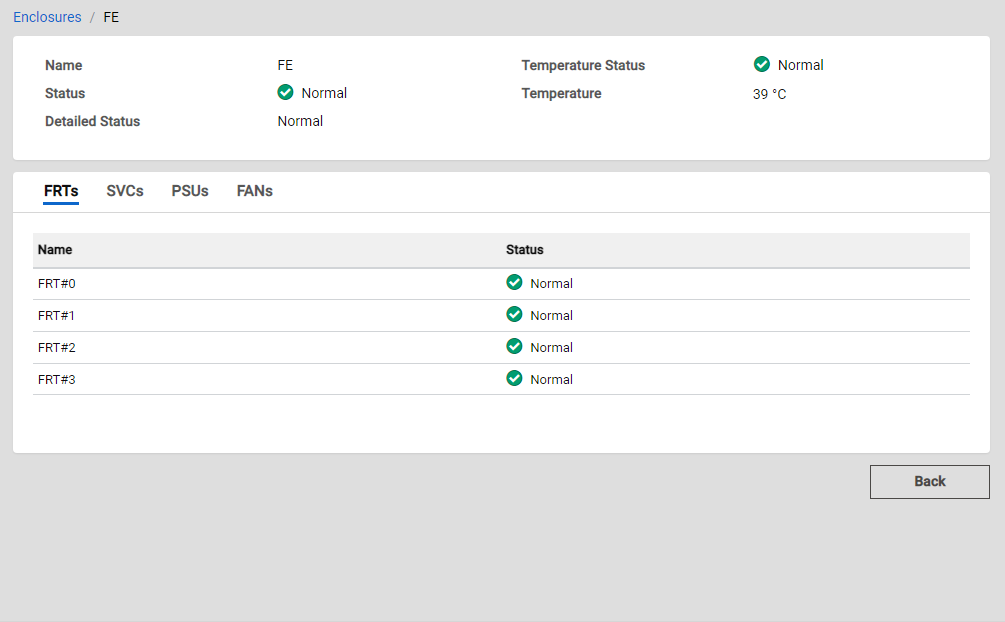
Actions

Icon/Button Description

Back

Displays the previous screen.

Caution
  • To return to the previous screen, use this button instead of the [Back] button on the browser.

    Using the [Back] button on the browser may cause unexpected behavior.

Enclosures / xxx

Click "Enclosures" to display its List View.

"xxx" indicates the name of the currently displayed enclosure.

Display Items

Basic Information

Parameter Name Description

Name

The enclosure name is displayed.

Status

The enclosure status is displayed.

  • Normal

    Normal state.

  • Unused

    Unused state.

  • Maintenance

    Maintenance state.

  • Warning

    Preventive maintenance is required.

  • Error

    An error occurred and maintenance is required.

Detailed Status

The detailed enclosure status is displayed.

  • Normal

    The component is operating normally.

  • Unconnected

    A faulty component exists in the enclosure.

  • Undefined

    The component is installed, but not used.

  • Undefined-Error Parts Exist

    The component, which is not being used, is in the error state.

  • Normal-Unused Parts Exist

    There is an unused component that is installed in the enclosure.

  • Maintenance

    The component is under maintenance.

  • Warning

    The component requires preventive maintenance.

  • Error

    An error has occurred in the component.

Temperature Status

The ambient temperature status is displayed.

  • Normal

    Normal state.

  • Unused

    Unused state.

  • Maintenance

    Maintenance state.

  • Warning

    Preventive maintenance is required.

  • Error

    An error occurred and maintenance is required.

Temperature

The ambient temperature is displayed.

The unit is "°C".

Information
  • When the information cannot be obtained due to a sensor failure, "0" is displayed.

FRT Information

Parameter Name Description

Name

The FRT name is displayed.

Status

The FRT status is displayed.

  • Normal

    Normal state.

  • Unused

    Unused state.

  • Maintenance

    Maintenance state.

  • Warning

    Preventive maintenance is required.

  • Error

    An error occurred and maintenance is required.

SVC Information

Parameter Name Description

Name

The SVC name is displayed.

Status

The SVC status is displayed.

  • Normal

    Normal state.

  • Unused

    Unused state.

  • Maintenance

    Maintenance state.

  • Warning

    Preventive maintenance is required.

  • Error

    An error occurred and maintenance is required.

PSU Information

Parameter Name Description

Name

The PSU name is displayed.

Status

The PSU status is displayed.

  • Normal

    Normal state.

  • Unused

    Unused state.

  • Maintenance

    Maintenance state.

  • Warning

    Preventive maintenance is required.

  • Error

    An error occurred and maintenance is required.

FAN Information

Parameter Name Description

Name

The fan name is displayed.

Status

The fan status is displayed.

  • Normal

    Normal state.

  • Unused

    Unused state.

  • Maintenance

    Maintenance state.

  • Warning

    Preventive maintenance is required.

  • Error

    An error occurred and maintenance is required.