
Hardware Detail View

Overview

The information of the storage system is displayed.

Screenshots
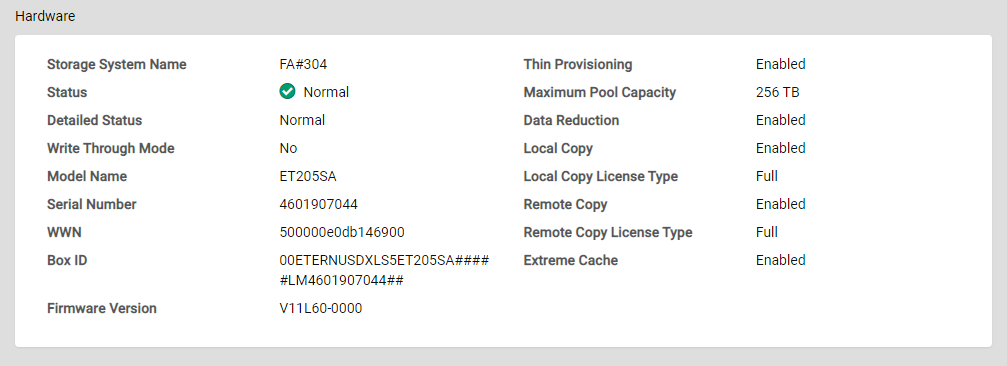
Display Items

Basic Information

Parameter Name Description

Storage System Name

The name of the storage system is displayed.

Status

The general status of the storage system is displayed.

  • Normal

    The storage system is in the normal state.

  • Maintenance

    The storage system is under maintenance.

  • Warning

    The storage system is in the warning state.

  • Error

    The storage system is in the failed state.

Information
  • If the current user does not have the "Status Display" policy, "N/A" is displayed.

Detailed Status

The detailed status of the storage system is displayed.

  • Normal

    The storage system is in the normal state.

  • Maintenance

    Components that are undergoing maintenance exist in the storage system. Or rebuild/copyback is being performed.

  • Change Controlling CM

    Changing of the Controlling CM is required.

  • Pinned Data

    Pinned data is detected.

  • Warning

    The component requires preventive maintenance. Or a bad sector is detected.

  • Error

    The component has an error.

  • Not Ready

    A failure is detected when starting or turning off the storage system. I/O from the host cannot be received normally.

  • Subsystem Down

    The storage system is in the failed state. I/O from the host cannot be received normally.

Information
  • If the current user does not have the "Status Display" policy, "N/A" is displayed.

Write Through Mode

The current status of the cache is displayed.

  • Yes

    When a Write request is issued from the host, "Write Complete" is displayed after writing to the cache area and the drives is complete.

  • No

    When a Write request is issued from the host, "Write Complete" is displayed after writing to the cache area is complete.

Information
  • If the current user does not have the "Status Display" or "Maintenance Operation" policy, "N/A" is displayed.

Model Name

The model name of the storage system is displayed.

Information
  • If the current user does not have the "Status Display" or "Maintenance Operation" policy, "N/A" is displayed.

Serial Number

The serial number of the storage system is displayed.

Information
  • If the current user does not have the "Status Display" or "Maintenance Operation" policy, "N/A" is displayed.

WWN

The WWN of the storage system is displayed.

Information
  • If the current user does not have the "Status Display" or "Maintenance Operation" policy, "N/A" is displayed.

Box ID

The Box ID of the storage system is displayed.

Information
  • If the current user does not have the "Status Display" or "Maintenance Operation" policy, "N/A" is displayed.

Firmware Version

The current controller firmware version is displayed.

Information
  • If the current user does not have the "Status Display" or "Maintenance Operation" policy, "N/A" is displayed.

Thin Provisioning

The Thin Provisioning setting for the storage system is displayed.

  • Enabled

    The Thin Provisioning function is enabled.

  • Disabled

    The Thin Provisioning function is disabled.

Information
  • If the current user does not have the following policies, "N/A" is displayed.

    • Status Display

    • RAID Group Management

    • Storage Management

Maximum Pool Capacity

The maximum pool capacity for the storage system is displayed.

The capacity is displayed with the appropriate "TB" or "PB" unit.

Information
  • If the current user does not have the following policies, "N/A" is displayed.

    • Status Display

    • RAID Group Management

    • Storage Management

Data Reduction

The Data Reduction setting for the storage system is displayed.

  • Enabled

    The Data Reduction function of the storage system is enabled.

  • Disabled

    The Data Reduction function of the storage system is disabled.

Information
  • If the current user does not have the following policies, "N/A" is displayed.

    • Status Display

    • Storage Management

    • Maintenance Operation

Local Copy

Whether the Local Advanced Copy function of the storage system is available is displayed.

  • Enabled

    The Local Advanced Copy function is available.

  • Disabled

    The Local Advanced Copy function is not available.

Information
  • If the current user does not have the following policies, "N/A" is displayed.

    • Status Display

    • Advanced Copy Management

    • Copy Session Management

    • Storage Management

Local Copy License Type

The Local Advanced Copy license type of the storage system is displayed.

  • Free

    A free license is registered.

  • Trial

    A trial license is registered.

  • Full

    A full license is registered. All of the Advanced Copy functions can be used.

Information
  • If the current user does not have the following policies, or the Local Advanced Copy function is not available, "N/A" is displayed.

    • Status Display

    • Advanced Copy Management

    • Copy Session Management

    • Storage Management

Remote Copy

Whether the Remote Advanced Copy function of the storage system is available is displayed.

  • Enabled

    The Remote Advanced Copy function is available.

  • Disabled

    The Remote Advanced Copy function is not available.

Information
  • If the current user does not have the following policies, "N/A" is displayed.

    • Status Display

    • Advanced Copy Management

    • Copy Session Management

    • Storage Management

Remote Copy License Type

The Remote Advanced Copy license type of the storage system is displayed.

  • Trial

    A trial license is registered.

  • Full

    A full license is registered. All of the Advanced Copy functions can be used.

Information
  • If the current user does not have the following policies, or the Remote Advanced Copy function is not available, "N/A" is displayed.

    • Status Display

    • Advanced Copy Management

    • Copy Session Management

    • Storage Management

Extreme Cache

The Extreme Cache setting or the Extreme Cache Pool setting of the storage system is displayed.

  • Enabled

    The Extreme Cache or Extreme Cache Pool function is enabled.

  • Disabled

    The Extreme Cache and Extreme Cache Pool functions are disabled.

Information
  • If the current user does not have the following policies, "N/A" is displayed.

    • Status Display

    • Volume - Create / Modify

    • Storage Management