


Service Controller
Overview
This function displays the Service Controller (SVC) information.
This is displayed for the ETERNUS DX900 S6 or the ETERNUS DX8900 S6.
Display Contents
The SVC information is displayed.
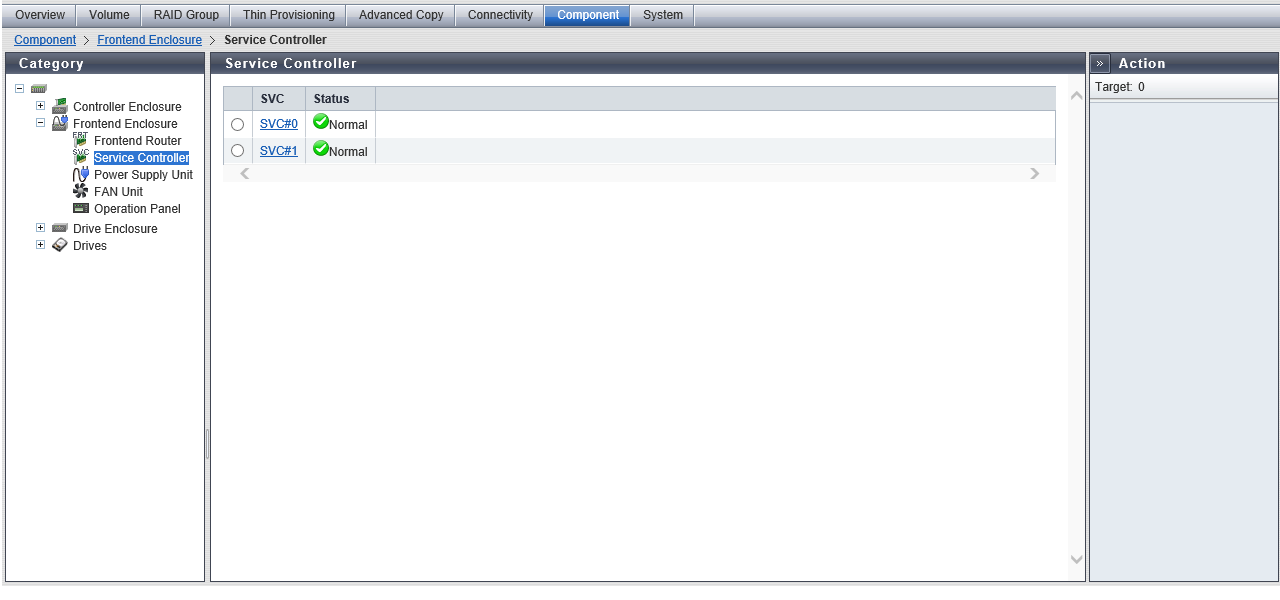
| Item | Description |
|---|---|
|
SVC |
The SVC number is displayed. Click this item to display the [Service Controller Detail] Screen. SVC#n |
|
Status |
The SVC status is displayed. Refer to Component Status for details. |
[Service Controller Detail] Screen
The detailed information of the SVC is displayed.
[Summary] Tab
SVC#n Information
| Item | Description |
|---|---|
|
Location |
The SVC number is displayed. SVC#n |
|
Status |
The SVC status is displayed. Refer to Component Status for details. |
|
Status Code |
The SVC status code is displayed. |
|
Error Code |
The SVC error code is displayed. |
|
Part Number |
The SVC part number is displayed. |
|
Serial Number |
The SVC serial number is displayed. |
|
Hardware Revision |
The hardware version of the SVC is displayed. |
|
Active EC |
The EC number of the current controller firmware is displayed. EC#n |
|
Next EC |
The EC number of the controller firmware that is to be run at the next power-on is displayed. EC#n |
|
Firmware Version |
The current controller firmware version is displayed. |
[Internal Parts] Tab
SVC#n Internal Parts Information
| Item | Description |
|---|---|
|
Parts |
Information for the Management cable that connects between the CM and SVC is displayed. Click this item to display the [Management Cable Detail] Screen. Management Cable (CE#n CM#n) |
|
Status |
The Management cable status is displayed. Refer to Component Status for details. |
|
Error Code |
The Management cable error code is displayed. |
[View] Tab
SVC#n Front View
| Item | Description |
|---|---|
|
(Storage system image) |
The front view of the FE that is installed in the storage system is displayed. Components that are not the target SVC are grayed out. The SVC status is displayed with an icon. Refer to Component Status for details. |
[Management Cable Detail] Screen
The detailed information of the Management cable is displayed.
[Summary] Tab
SVC#n Management Cable (CE#n CM#n) Information
| Item | Description |
|---|---|
|
Status |
The Management cable status is displayed. Refer to Component Status for details. |
|
Status Code |
The Management cable status code is displayed. |
|
Error Code |
The Management cable error code is displayed. |