
SANtricity express configuration manuals ( CA08872-012 )
Perform SAS-specific tasks in ETERNUS AB/HB series - VMware
For the SAS protocol, you determine host port addresses and make the recommended settings.
Step 1: Determine SAS host identifiers—VMware
Find the SAS addresses using the HBA utility, and then use the HBA BIOS to make the appropriate configuration settings.
Review the guidelines for HBA utilities:
-
Most HBA vendors offer an HBA utility.
-
Download the HBA utility from your HBA vendor’s web site.
-
Install the utility.
-
Use the HBA BIOS to select the appropriate settings for your configuration.
Step 2: Record your configuration
You can generate and print a PDF of this page, and then use the following worksheet to record your protocol-specific storage configuration information. You need this information to perform provisioning tasks.
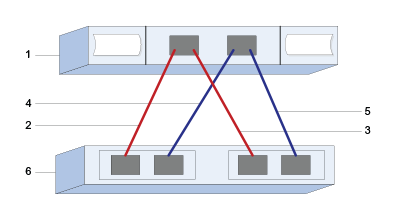
| Callout No. | Host (initiator) port connections | SAS address |
|---|---|---|
1 |
Host |
not applicable |
2 |
Host (initiator) port 1 connected to Controller A, port 1 |
|
3 |
Host (initiator) port 1 connected to Controller B, port 1 |
|
4 |
Host (initiator) port 2 connected to Controller A, port 1 |
|
5 |
Host (initiator) port 2 connected to Controller B, port 1 |
Recommended configurations consist of two target ports.
Mapping host name |
|
Host OS type |
