
MetroCluster Manuals ( CA08871-401 )
Platform port assignments for 12-port Cisco 9336C-FX2 switches in a MetroCluster IP configuration
The port usage in a MetroCluster IP configuration depends on the switch model and platform type.
Review the following considerations before using the configuration tables:
-
The tables in this section are for 12-port Cisco 9336C-FX2 switches.
If you have a 36-port Cisco 9336C-FX2 switch that isn’t connecting NS224 shelves, use the tables in Platform port assignments for Cisco 3232C or 36-port Cisco 9336C-FX2 switches.
If you have a 36-port Cisco 9336C-FX2 switch and at least one MetroCluster configuration or DR group is connecting NS224 shelves to the MetroCluster switch, use the tables in Platform port assignments for a 36-port Cisco 9336C-FX2 switch connecting NS224 storage.
| The 12-port Cisco 9336C-FX2 switch doesn’t support connecting NS224 shelves to the MetroCluster switch. |
-
The following tables show the port usage for site A. The same cabling is used for site B.
-
You cannot configure the switches with ports of different speeds (for example, a mix of 100 Gbps ports and 40 Gbps ports).
-
If you are configuring a single MetroCluster with the switches, use the MetroCluster 1 port group.
Keep track of the MetroCluster port group (MetroCluster 1, MetroCluster 2). You’ll need it when using the RcfFileGenerator tool as described later in this configuration procedure.
-
The RcfFileGenerator for MetroCluster IP also provides a per-port cabling overview for each switch.
Choose the correct cabling table for your configuration
Use the following table to determine which cabling table you should follow.
| If your system is… | Use this cabling table… |
|---|---|
ETERNUS AX1200, ETERNUS AX1200 ASA ETERNUS AX2200, ETERNUS AX2200 ASA ETERNUS AC2100, ETERNUS AC2100 ASA |
|
ETERNUS AX1300 |
|
ETERNUS AX2300, ETERNUS AC2200 ETERNUS HX6200 |
The table you follow depends on whether you are using a 25G (group 3a) or 100G (group 3b) Ethernet card. |
ETERNUS AX4100, ETERNUS AX4100 ASA |
|
ETERNUS AX4200 |
Review the platform port assignments to cable an ETERNUS AX1200, ETERNUS AX1200 ASA, ETERNUS AX2200, ETERNUS AX2200 ASA, ETERNUS AC2100, or ETERNUS AC2100 ASA system to a 12-port Cisco 9336C-FX2 switch:
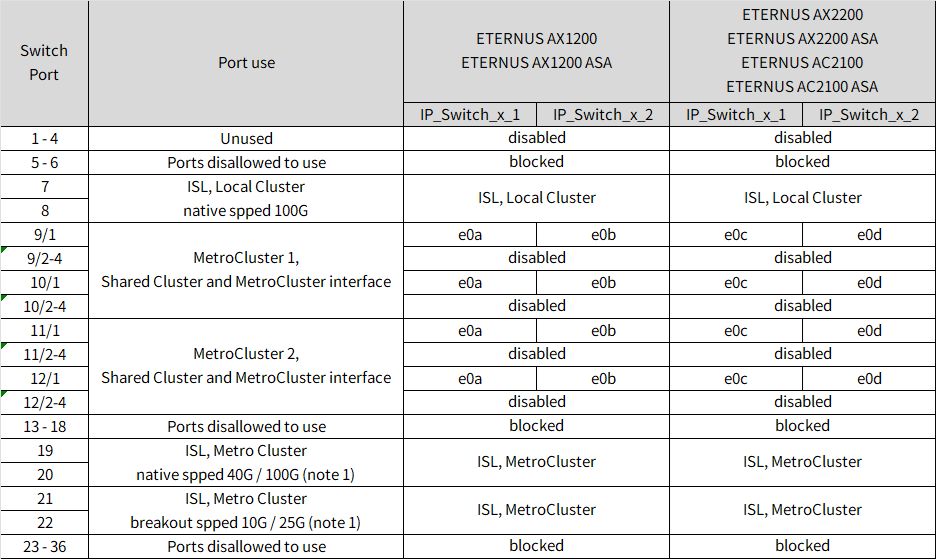
Note 1: You can only configure ports 19 and 20 or ports 21 and 22. If you use ports 19 and 20 first, then ports 21 and 22 are blocked. If you use ports 21 and 22 first, then ports 19 and 20 are blocked.
Review the platform port assignments to cable an ETERNUS AX1300 system to a 12-port Cisco 9336C-FX2 switch:
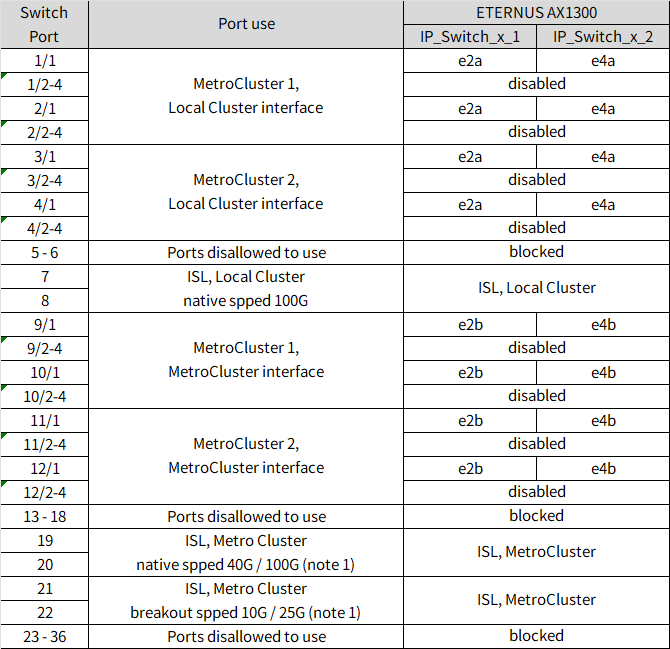
Note 1: You can only configure ports 19 and 20 or ports 21 and 22. If you use ports 19 and 20 first, then ports 21 and 22 are blocked. If you use ports 21 and 22 first, then ports 19 and 20 are blocked.
Review the platform port assignments to cable an ETERNUS AX2300, ETERNUS AC2200, or ETERNUS HX6200 system to a 12-port Cisco 9336C-FX2 switch using a four-port 25G Ethernet card.
| This configuration requires a four-port 25G Ethernet card in slot 4 to connect the local cluster and HA interfaces. |
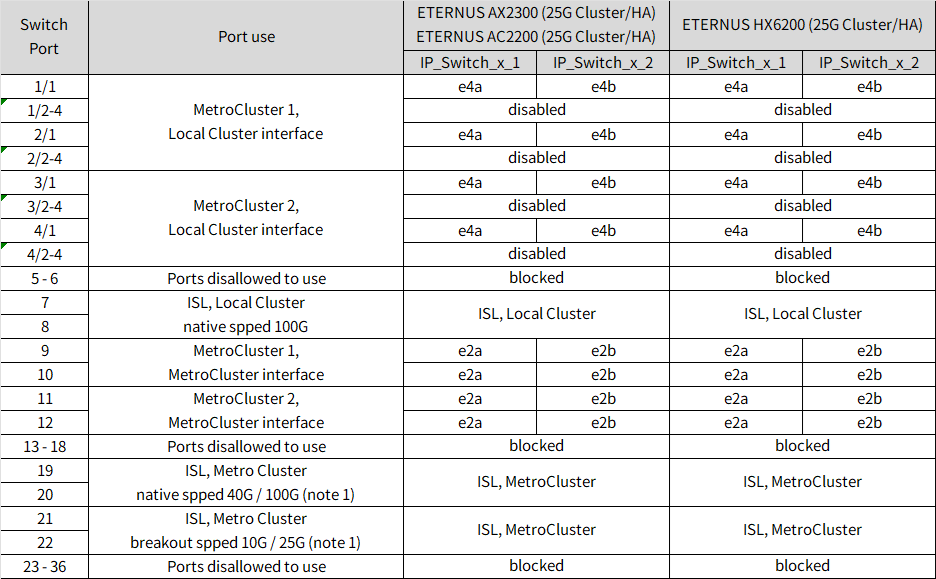
Note 1: You can only configure ports 19 and 20 or ports 21 and 22. If you use ports 19 and 20 first, then ports 21 and 22 are blocked. If you use ports 21 and 22 first, then ports 19 and 20 are blocked.
Review the platform port assignments to cable an ETERNUS AX2300, ETERNUS AC2200, or ETERNUS HX6200 system to a 12-port Cisco 9336C-FX2 switch using a two-port 100G Ethernet card.
| This configuration requires a two-port 100G Ethernet card in slot 4 to connect the local cluster and HA interfaces. |
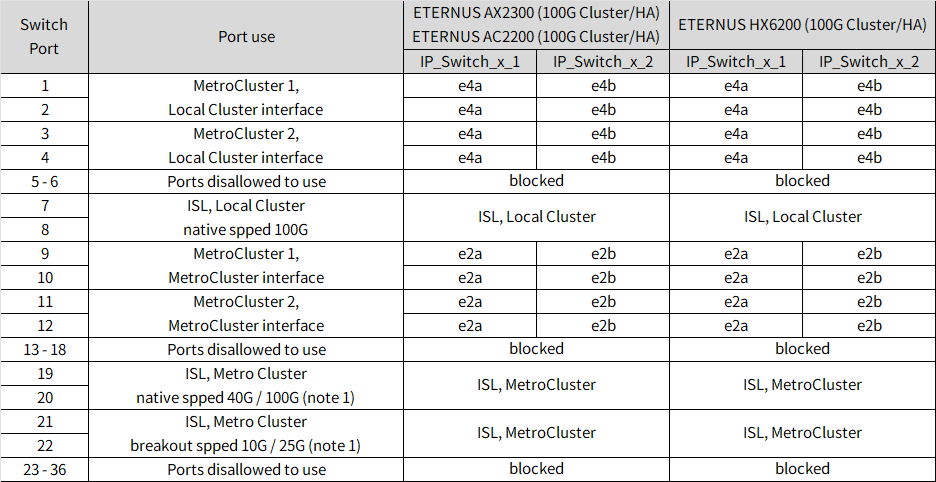
Note 1: You can only configure ports 19 and 20 or ports 21 and 22. If you use ports 19 and 20 first, then ports 21 and 22 are blocked. If you use ports 21 and 22 first, then ports 19 and 20 are blocked.
Review the platform port assignments to cable an ETERNUS AX4100 or ETERNUS AX4100 ASA system to a 12-port Cisco 9336C-FX2 switch:
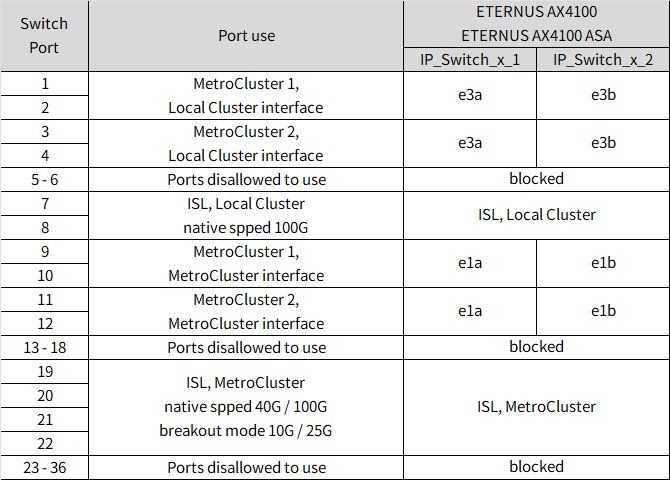
Note 1: You can only configure ports 19 and 20 or ports 21 and 22. If you use ports 19 and 20 first, then ports 21 and 22 are blocked. If you use ports 21 and 22 first, then ports 19 and 20 are blocked.
Review the platform port assignments to cable an ETERNUS AX4200 system to a 12-port Cisco 9336C-FX2 switch:
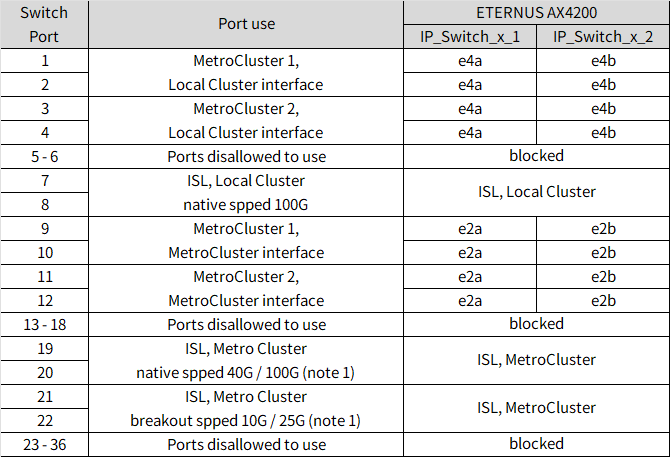
Note 1: You can only configure ports 19 and 20 or ports 21 and 22. If you use ports 19 and 20 first, then ports 21 and 22 are blocked. If you use ports 21 and 22 first, then ports 19 and 20 are blocked.
