MetroCluster Manuals ( CA08871-401 )
Platform port assignments for NVIDIA supported SN2100 IP switches in a MetroCluster IP configuration
The port usage in a MetroCluster IP configuration depends on the switch model and platform type.
Review the following considerations before using the configuration tables:
-
Connecting an eight-node or two four-node MetroCluster configurations requires ONTAP 9.14.1 or later and RCF file version 2.00 or later.
The RCF file version is different to the version of the RCFfilegenerator tool used to generate the file. For example, you can generate an RCF file version 2.00 using RCFfilegenerator v1.6c.
-
If you cable multiple MetroCluster configurations then follow the respective table. For example:
| Ports 13 and 14 can be used in native speed mode supporting 40 Gbps and 100 Gbps, or in breakout mode to support 4 × 25 Gbps or 4 × 10 Gbps. If they use native speed mode they are represented as ports 13 and 14. If they use breakout mode, either 4 × 25 Gbps or 4 × 10 Gbps, then they are represented as ports 13s0-3 and 14s0-3. |
The following sections describe the physical cabling outline. You can also refer to the RcfFileGenerator for detailed cabling information.
Choose the correct cabling table for your configuration
Use the following table to determine which cabling table you should follow.
| If your system is… | Use this cabling table… |
|---|---|
ETERNUS AX1200, ETERNUS AX1200 ASA ETERNUS AX2200, ETERNUS AX2200 ASA ETERNUS AC2100, ETERNUS AC2100 ASA |
|
ETERNUS AX1300 |
|
ETERNUS AX2300 ETERNUS AC2200 ETERNUS HX6200 |
The table you follow depends on whether you are using a 25G (group 3a) or 100G (group 3b) Ethernet card. |
ETERNUS AX4100, ETERNUS AC4100 ASA ETERNUS HX6100 |
|
ETERNUS AX4200 |
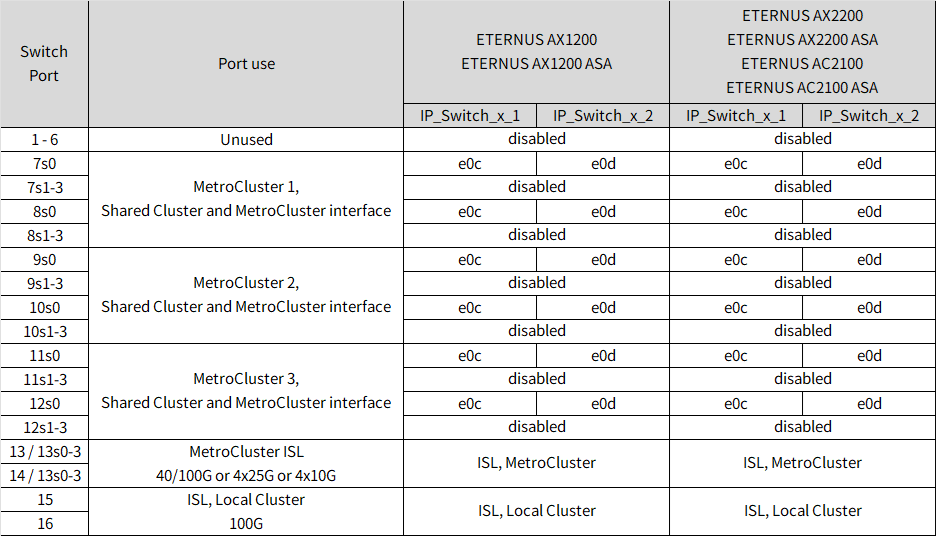
Review the platform port assignments to cable an ETERNUS AX1200, ETERNUS AX1200 ASA, ETERNUS AX2200, ETERNUS AX2200 ASA, ETERNUS AC2100, or ETERNUS AC2100 ASA system to a NVIDIA SN2100 switch:
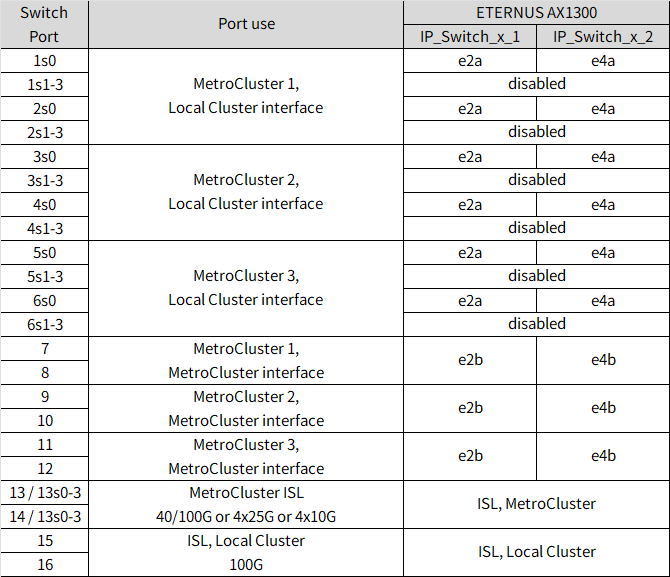
Review the platform port assignments to cable an ETERNUS AX1300 system to a NVIDIA SN2100 switch:
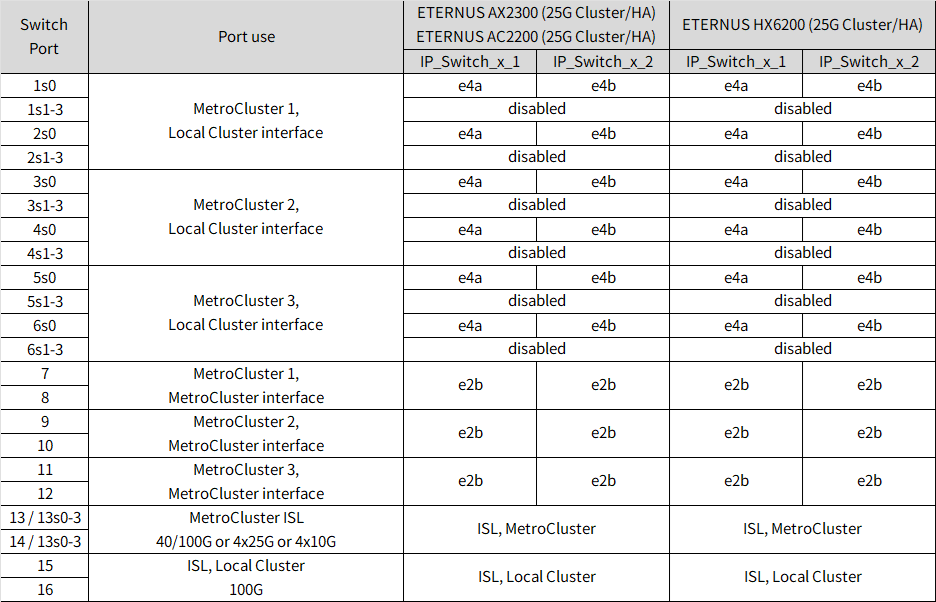
Review the platform port assignments to cable an ETERNUS AX2300 or ETERNUS HX6200 system to a NVIDIA SN2100 switch using a four-port 25G Ethernet card:
| This configuration requires a four-port 25G Ethernet card in slot 4 to connect the local cluster and HA interfaces. |
Review the platform port assignments to cable an ETERNUS AX2300 or ETERNUS HX6200 system to a NVIDIA SN2100 switch using a two-port 100G Ethernet card:
| This configuration requires a two-port 100G Ethernet card in slot 4 to connect the local cluster and HA interfaces. |
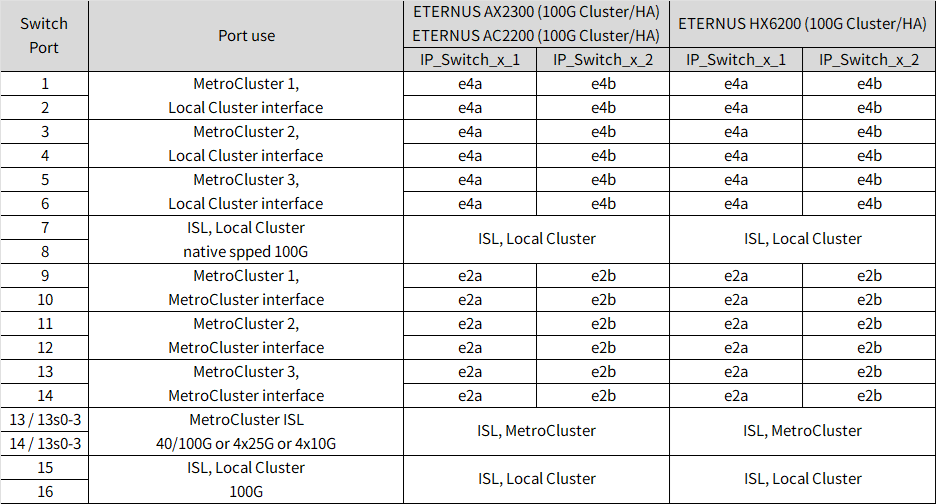
Review the platform port assignments to cable a ETERNUS AX4100, ETERNUS AC4100 ASA,or ETERNUS HX6100 system to a NVIDIA SN2100 switch:
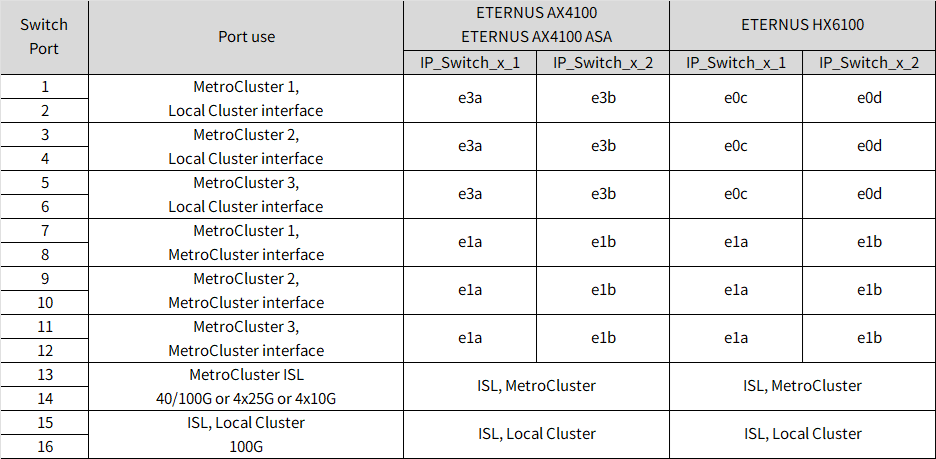
Note 1: Use either ports e4a and e4e or e4a and e8a if you are using an X91440A adapter (40Gbps). Use either ports e4a and e4b or e4a and e8a if you are using an X91153A adapter (100Gbps).
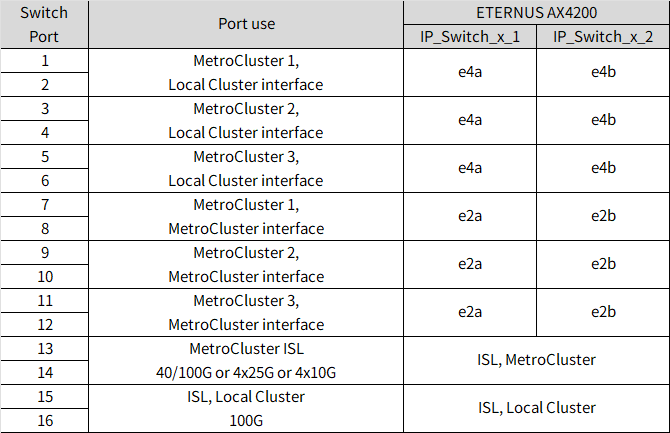
Review the platform port assignments to cable an ETERNUS AX4200 system to a NVIDIA SN2100 switch: